
Coaching that runs itself.
Coach schedules, prices, and prepaid packages in one place, with each lesson booking the court and the coach together.
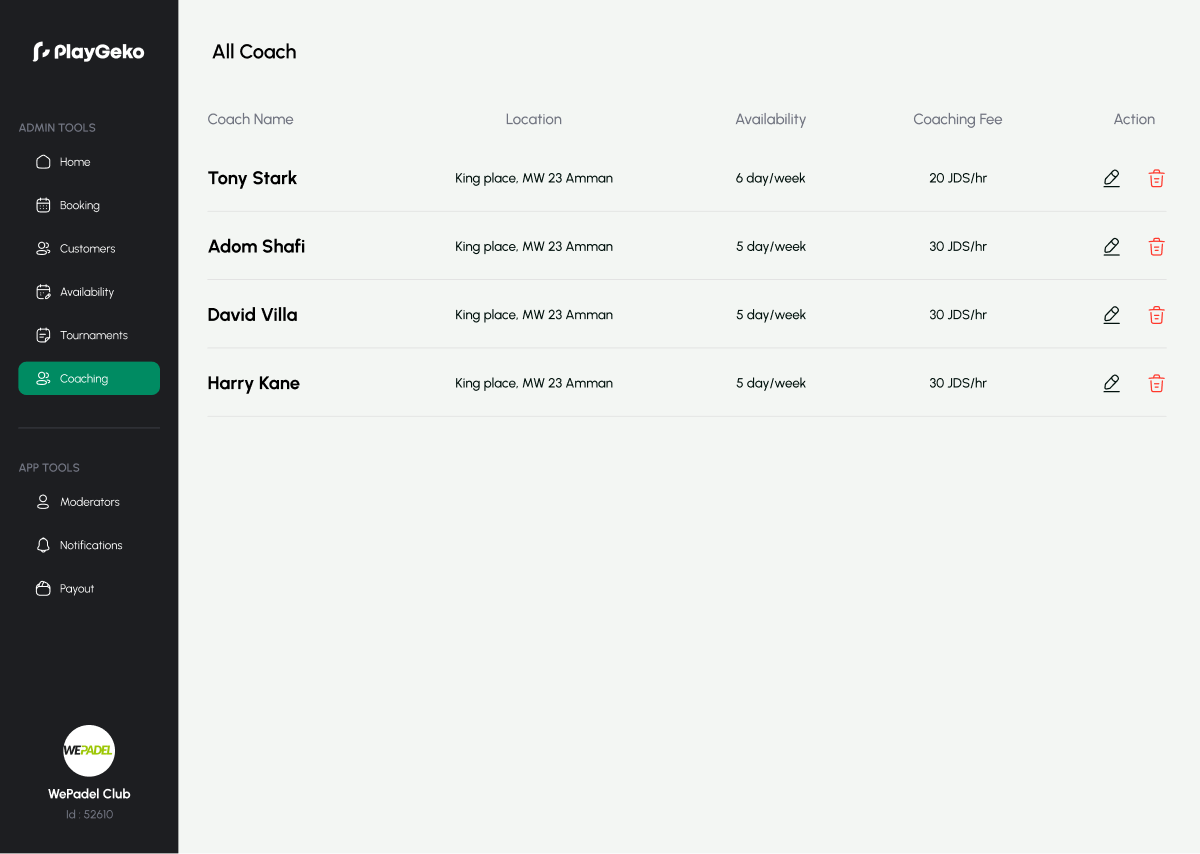
Coaching is your best revenue, and it is run from notebooks.
Coach availability lives in personal phones. Package balances live in a notebook. A lesson is arranged by message, then someone remembers to block the court, or forgets.
Playgeko gives each coach a schedule and prices, sells packages, and tracks every session against the balance.
Everything between a coach profile and a renewal
Coach profiles per branch
Add each coach with a name, photo, and hourly rate, and mark them active or inactive. Owners and admins manage the roster, and coaches show up in the player app for the branch they work at.
Weekly schedules with their own prices
Set recurring availability blocks for each day, and give each block its own price for 30, 60, 90, or 120-minute sessions. A peak-hour block can cost more than a morning one. Overlapping blocks are rejected, and the price a player pays comes from the block the session falls in.
Court and coach booked together
A coaching session reserves a court and a coach at the same time, and checks both for clashes. Staff can add players, mark the session public or private, repeat it weekly for up to 52 sessions, and record whether it was completed or a no-show.
Prepaid session packages
Create packages for each coach, such as a 10-session bundle, with a session count and a price. Players can buy them in the app and pay online. Staff can also sell a package at the front desk and record a cash or card-terminal payment.
Balances that update themselves
Sessions used are counted from the player’s actual bookings, so a cancelled lesson automatically returns the session to the balance. Staff can see who has sessions left and who has an upcoming booking. Players see their remaining sessions in the app.
Renewal alerts for your team
When a package has one to three sessions left, or expires within 14 days, Playgeko creates a renewal follow-up task for the member’s owner on your team. If nobody owns the member yet, branch owners and admins are notified so the opportunity does not slip.
Find a coach in the player app
Players search coaches by name or distance, sort by price or proximity, then choose a court, a day, a time, and a duration. They can book a single session or buy a package and book from the balance.
Coaching lands in your CRM
Each coaching booking is logged on the member’s record, with the package status shown there, so the front desk can see who is a coaching client at a glance.
From a package sale to a renewal
One player’s journey, and what your team does at each point.
- Week 1
A player finds a coach in the app, buys a 10-session package, and books the first lesson. The court and coach are reserved together.
- Week 4
The player cancels one lesson in time. The session goes back to the balance automatically.
- Week 8
Three sessions are left. Playgeko creates a renewal task for the member’s owner, due the next day.
- Week 8
The coach’s client mentions it at the club. Your front desk offers the next package and records the payment on the spot.
Who it helps
Owners
Turn coaching into recurring revenue with packages, and see what each coach is bringing in.
Staff
Book lessons, sell packages, and check balances without chasing the coach.
Players
Find a coach, see the price up front, and track sessions left in the app.
Up and running in three steps
- Step 1
Add your coaches
Create a profile for each coach, with their hourly rate and photo.
- Step 2
Set schedules and prices
Build their weekly availability and set a price for each session length.
- Step 3
Create packages
Define bundles of sessions, then sell them in the app or at the front desk.
Coaching is part of the Professional plan.
Works with the rest of Playgeko
Coaching sessions occupy real courts, so they appear on your booking calendar. Package status feeds your CRM, and renewals show up in your finance report.
Court Booking System
One calendar for every court and sport, so staff and players always see the same real-time availability.
CRM & Member Management
A single member record built from real bookings, with leads, tasks, and WhatsApp conversations alongside it, so your team always has the full picture.
CRM Automations & Follow-ups
Build a sequence once, and Playgeko creates the tasks and sends the messages on schedule, so no new member or renewal goes quiet.
Questions clubs ask
Can coaches log in and manage their own schedule?
Not today. Coaches are managed by your club’s owners and admins, who set their availability and prices. Coaches do not have their own login yet.
How are package balances calculated?
Sessions used are counted from the player’s confirmed and pending coaching bookings linked to the package. Cancel a lesson and the session returns to the balance.
Can players buy packages online?
Yes. Players buy a package in the app and pay by card. Staff can also sell packages in person and record a cash or card-terminal payment.
Does a package expire?
Expiry dates are not configurable yet, so packages currently stay valid until the sessions are used. Renewal alerts trigger when a package is low on sessions, or when an expiry date is set and approaches.
What session lengths are available?
Coaching sessions can be priced for 30, 60, 90, or 120 minutes.