
Run a tournament without the spreadsheet.
Registration, seeding, brackets, scoring, and entry fees in one system, from the first sign-up to the final match.
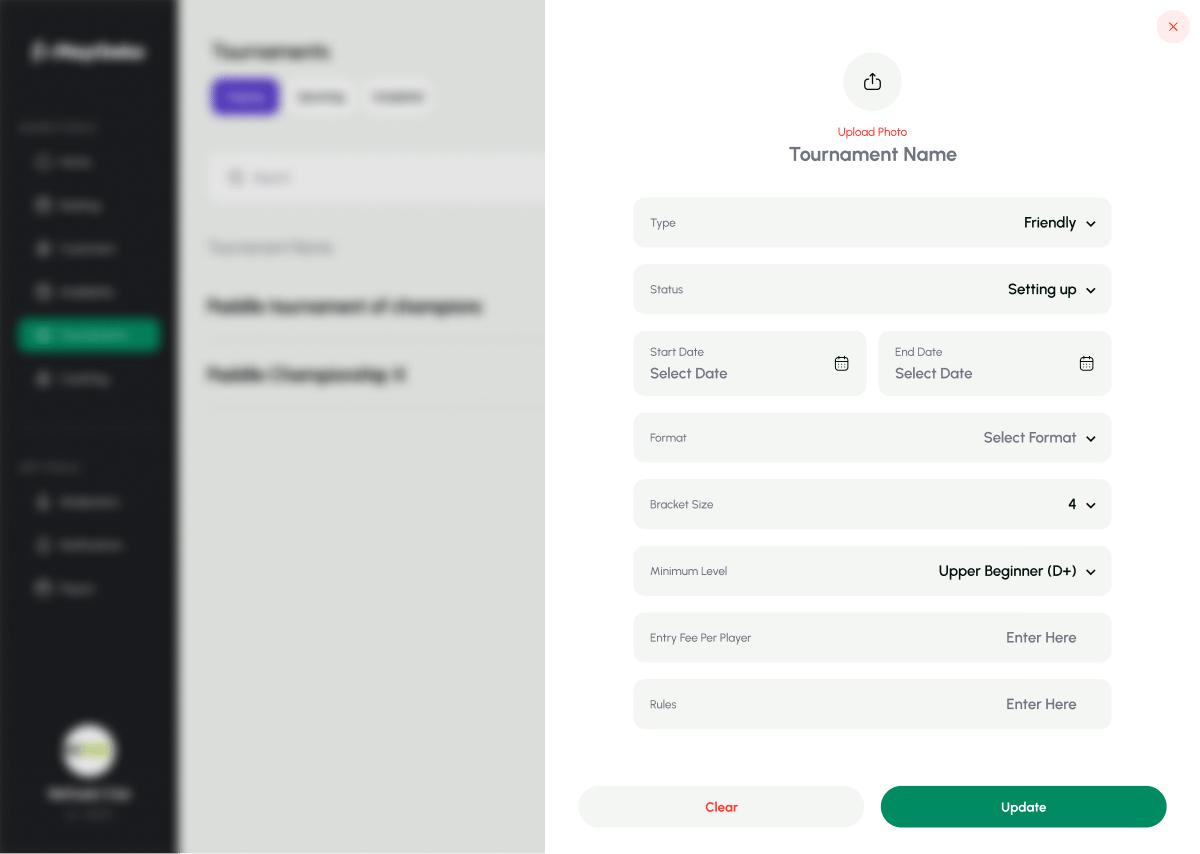
Tournaments are your best event, and your biggest admin job.
A tournament means sign-ups in one chat, payments in another, a bracket in a spreadsheet, and scores shouted across the courts. One late change and everything has to be redone.
Playgeko keeps registration, fees, brackets, and results together, so changes flow through instead of being rebuilt.
From sign-up to champion
Four bracket formats
Choose single elimination, double elimination, round robin, or Swiss. Brackets are generated and managed through Challonge, and displayed right in your dashboard.
Flexible size and team format
Set events from 4 to 256 participants, with teams of 1 to 50 players, so singles, padel doubles, and five-a-side all fit. Registration enforces the exact team size.
Registration that opens and closes itself
Set when registration opens and closes, and Playgeko moves the tournament between stages on schedule. You can still override any stage by hand. Staff add teams and players from the player list, and can edit or remove them while registration is open.
Drag-and-drop seeding
Order your teams by dragging them into place before the tournament starts. Seeds carry through to the bracket.
Set-by-set scoring
Enter scores set by set, such as 6-4, 7-5. Playgeko works out the winner and updates the bracket. Matches are grouped by round, and final ranks, including champion and runner-up, are recorded when you finalize.
Entry fees and payments
Charge per team or per player. Staff record payments in cash or by card terminal, including partial payments, and each registration shows its payment status. Tournament revenue appears in your finance reports as its own category.
Refunds when plans change
Cancel a tournament and all entry-fee payments are refunded with the reason recorded. You can also refund a single registration.
Hold courts for the event
Block the courts you need for the tournament so regular bookings cannot take them, and manage those blocks from the tournament page. Run the whole event from your phone with the admin mobile app.
A weekend doubles tournament
How one event moves from idea to trophy.
- Week -3
You create a 16-team round robin with team size 2, an entry fee per player, and registration dates. Registration opens automatically.
- Week -1
Staff register teams as they sign up and record cash or card payments. The registration list shows who has paid.
- Day -1
Registration closes on schedule. You seed the teams by dragging them into order and block the courts for the weekend.
- Saturday
You start the tournament and the bracket is generated. Staff enter scores set by set as matches finish.
- Sunday
When every match is complete you finalize. The champion and runner-up are recorded, and fees show up in your finance report.
Who it helps
Owners
Turn events into reliable revenue and see exactly what was collected and refunded.
Staff
Register teams, take payments, and enter scores from the dashboard or your phone.
Players
Compete in a well-run event with a clear bracket and results.
Up and running in three steps
- Step 1
Create the event
Pick the format, team size, entry fee, and registration dates.
- Step 2
Register and seed
Add teams, record fees, then drag teams into seeding order.
- Step 3
Play and finalize
Start the bracket, enter scores, and finalize to record the champion.
Tournaments are part of the Professional plan.
Works with the rest of Playgeko
Tournaments use your courts, your member list, and your payments. Blocks keep courts clear, players come from your player list, and entry fees flow into your finance reports.
Court Booking System
One calendar for every court and sport, so staff and players always see the same real-time availability.
Matches & Tournaments
Friendly and ranked games, skill levels, shared costs, and the tools to fill quiet hours, with full tournaments when you are ready to step up.
Payments & Finance Reports
Every booking, coaching session, and tournament entry in one finance report, split by cash and card, ready to export.
Questions clubs ask
Can players register themselves?
Not in the app today. Registration is handled by your staff from the dashboard or the admin mobile app, who add teams and record entry fees.
Does it assign courts to matches automatically?
No. You can block courts for the event so they are kept free, but matches are not automatically assigned to courts.
How do players follow results?
Brackets are hosted on Challonge, which you can share with players. Your team enters scores in Playgeko.
Can I charge entry fees?
Yes, per team or per player. Staff record payments in cash or by card terminal, including partial payments. Online payment for tournament entry is not available yet.
What happens if I cancel?
Entry-fee payments are refunded automatically and the reason is recorded.