
The right access for every role.
Give each team member exactly the access they need, branch by branch, and see how your team is performing.
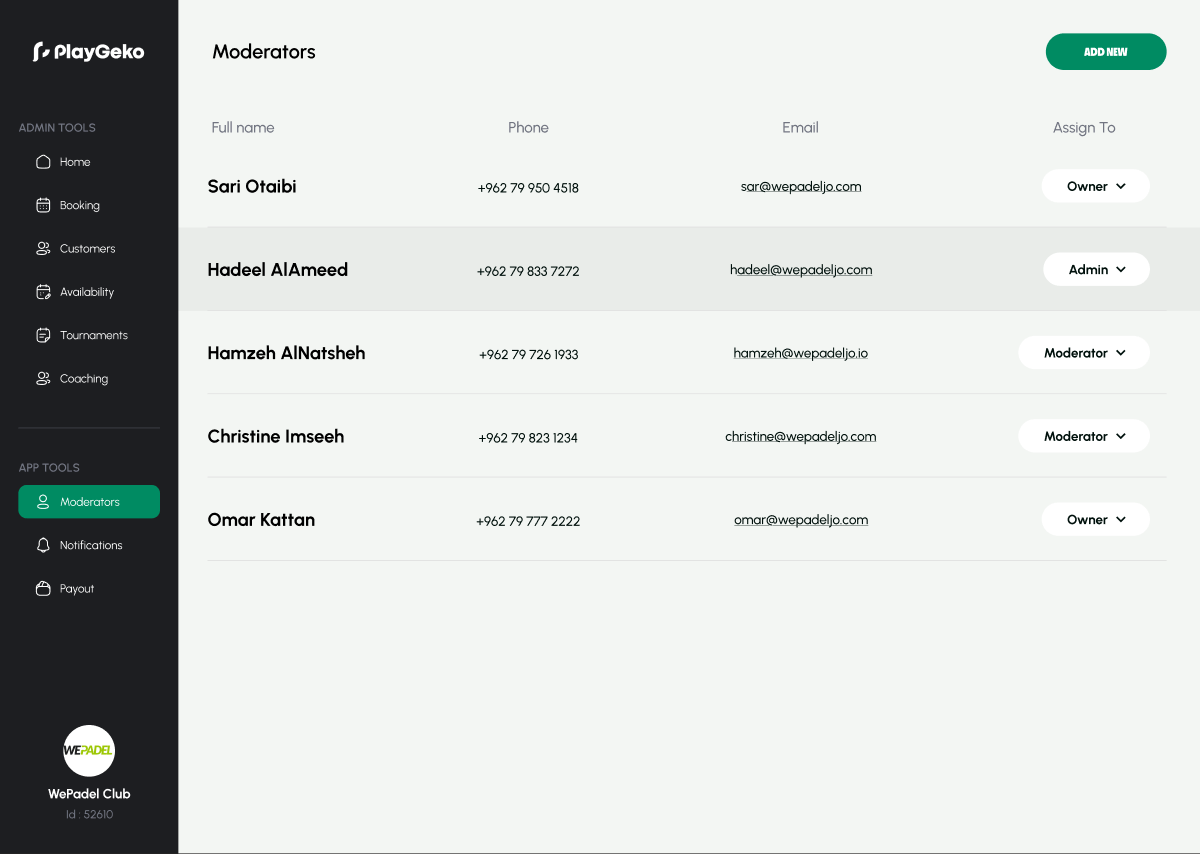
Everyone shares a login, or nobody can do their job.
Clubs usually end up at one of two extremes. Either the whole team shares a password and anyone can see everything, or access is so locked down that the owner has to do every refund and report personally.
Playgeko gives each person their own login and a role that fits their job, so the front desk can run the day without seeing your finances.
Control without the overhead
Three roles that match how clubs work
Staff handle the front desk: bookings, check-ins, payments, customers, and follow-ups. Admins add team management, refunds, coach management, CRM import and export, and sequences. Owners can do everything, including managing the club’s billing.
Roles per branch
Access is set branch by branch, so a manager at one location does not automatically see another. Owners can see across the club.
Invite by email
Add a team member with their email, name, and role. If they do not have an account yet, Playgeko sends an invitation to set a password. You can change their role later, or remove them.
Sensitive pages stay out of the front desk
Staff do not see the team, finance, payout, or court management pages in the dashboard. Importing and exporting customer data is limited to admins and owners.
Accountable payments
When staff record a cash or card-terminal payment or a cash refund, the system records who processed it. Completed financial transactions cannot be edited after the fact.
Performance scorecards
Each team member gets a scorecard: contacts created, messages sent by channel, sales closed, packages sold, revenue attributed, conversion rate, renewal rate, and on-time follow-ups, with a trend against the previous period. Staff see their own, and admins see everyone’s.
A leaderboard for the team
Admins and owners can compare the team over any date range, to recognize who is converting and who needs support.
The admin mobile app
Run the day from your phone: see today’s bookings and revenue, create and edit bookings, check players in, record payments, look up customers, call or WhatsApp them in one tap, and manage tournaments.
Onboarding a new receptionist
From first day to first booking in minutes.
- Monday
You invite a new hire by email with the staff role for your main branch. They set their password from the invitation.
- Monday
They log in and see the calendar, customers, and tasks. Finance, payouts, and team pages are not shown.
- Tuesday
They check players in and take a cash payment. The payment is recorded against their name.
- Month end
You compare scorecards and see how their follow-ups are going.
Who it helps
Owners
Delegate with confidence, and keep finance and billing to yourself.
Staff
Get a clean workspace built for the front desk, on desktop or phone.
Players
Get faster, more consistent service because your team can act without waiting for the owner.
Up and running in three steps
- Step 1
Invite your team
Add each person by email and choose their role.
- Step 2
Assign branches
Give each person access to the branches they work at.
- Step 3
Install the mobile app
Sign in on the admin mobile app to run the day on the go.
Roles are available on every plan. The admin mobile app is part of the Professional plan, and team size depends on your plan.
Works with the rest of Playgeko
Roles apply across Playgeko. They decide who can take payments, who can see finance, and who can run sequences.
CRM & Member Management
A single member record built from real bookings, with leads, tasks, and WhatsApp conversations alongside it, so your team always has the full picture.
Club Admin Mobile App
Bookings, check-ins, payments, and customers on your phone, for owners and staff who are never at one desk.
Payments & Finance Reports
Every booking, coaching session, and tournament entry in one finance report, split by cash and card, ready to export.
Questions clubs ask
What roles are there?
Three: owner, admin, and staff. They are assigned per branch. Custom roles and a rules engine are not available.
Can staff export our customer data?
The import and export tools are limited to admins and owners in the dashboard.
Is there an audit log?
Playgeko records who processed each cash or card-terminal payment and refund, and logs certain sensitive actions such as opening or editing a customer profile and inviting staff. A full activity log you can browse is not available yet.
Can coaches have their own logins?
Not yet. Coaches are managed by your owners and admins.
Can someone work at more than one club?
A staff member can hold roles on several branches of the same club, but not across different clubs.