
Every court, booked right.
One calendar for every court and sport, so staff and players always see the same real-time availability.
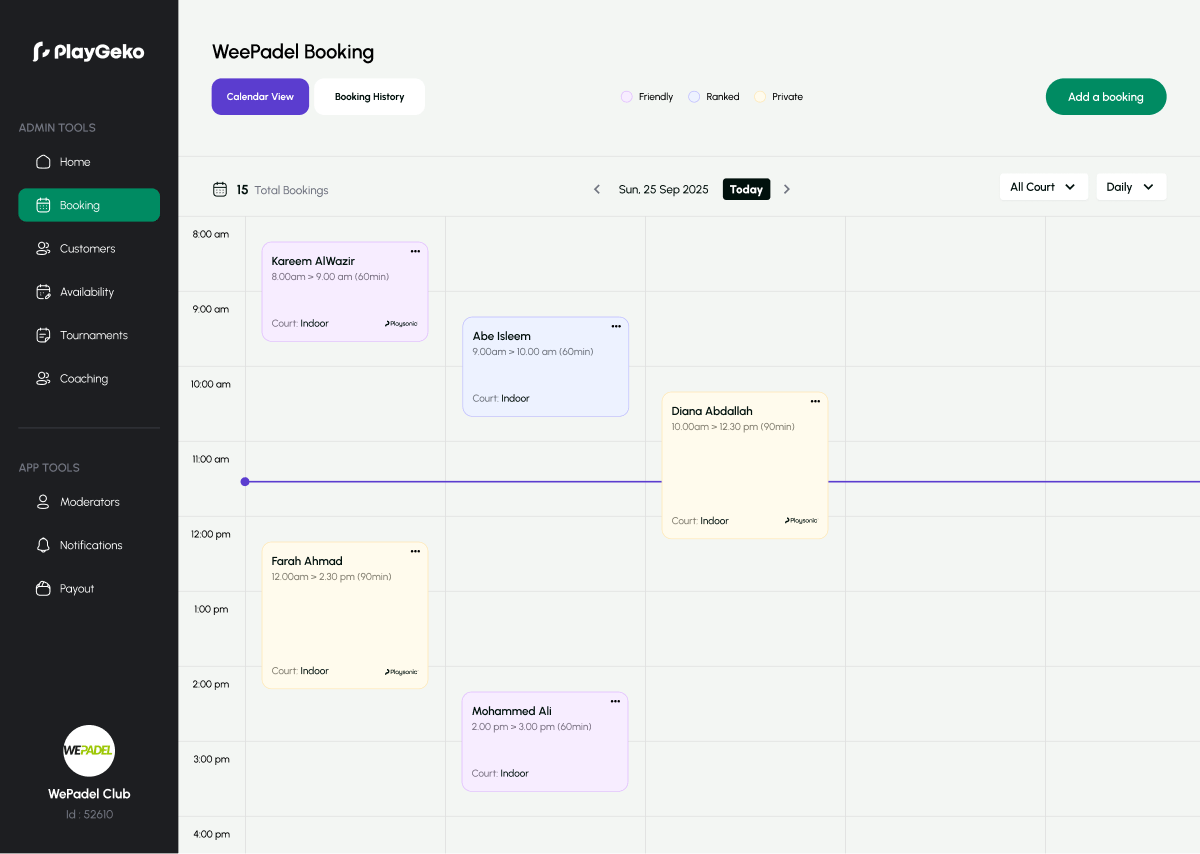
Bookings arrive from five places. Your calendar lives in one.
Phone calls, WhatsApp messages, walk-ins, regulars who always want the same slot. When each one lands in a different place, someone has to reconcile them, and one missed message means a double-booking or an empty court at 7pm.
Playgeko puts every booking into a single calendar with pricing, payment status, and availability attached, so what staff see is what players see.
Built for how clubs actually take bookings
A calendar your whole team can work in
See the day or the week, filter by court, and watch bookings, blocks, and operating hours in one view. Drag a booking to a new time or court and it snaps to a 30-minute grid. Playgeko checks the move against your hours, other bookings, and blocks before it lets you confirm.
Pricing that follows your demand
Set peak periods per weekday, including overnight ranges, and give each court its own price for 30, 60, 90, and 120 minutes at peak and off-peak. Add date-based overrides for holidays and events as a multiplier, a fixed amount added to the base price, or a set price. The booking price is calculated as you pick the slot.
Recurring bookings for your regulars
Create a daily, weekly, or monthly series for up to 52 sessions, on the days and times you choose. A preview lists every occurrence with its price, and flags any that clash with an existing booking, a court block, or your operating hours. Skip single dates, or cancel the whole series, or this booking and everything after it.
No double-bookings, by design
Overlapping bookings on the same court are rejected by the database itself, so two staff members clicking at the same moment cannot both win. Bookings that fall outside operating hours or into a court block are rejected too. And while a player is paying, their slot is held so nobody else can take it.
Blocks for maintenance and private events
Close a court for resurfacing, a corporate day, or a tournament. Blocked time disappears from availability and cannot be double-booked. You can attach a reason and link the block to a tournament.
Payments tracked on every booking
See at a glance what is paid and what is not. Staff can record cash or card-terminal payments, split across two methods, and issue refunds as wallet credit or cash. Player card payments are held at booking and captured automatically once your cancellation window has passed.
Every sport, every branch
Padel, tennis, squash, badminton, pickleball, football, futsal, basketball, and more are supported out of the box. Run several branches, each with its own timezone and currency, from the same dashboard.
Clear cancellation rules
Set a cancellation window per branch, with a 24-hour default. Players who cancel in time get their money back automatically. After the window, staff decide whether to refund. Cancelling frees the slot straight away.
A busy Tuesday evening, without the juggling
Here is how a typical peak-hour rush looks when the calendar does the checking for you.
- 4:30 pm
A regular asks for his usual Thursday 7pm slot, every week until the end of the month. You create a weekly series, review the preview, and see one date clashes with a private event.
- 5:10 pm
You skip that single date and save. The rest of the series is booked, priced at peak rates, and visible on the calendar.
- 6:45 pm
Two players try to book Court 3 at 8pm at the same moment. One gets it. The other sees it is taken and picks Court 4.
- 7:20 pm
A walk-in pays in cash for an hour. You record the payment against the booking, and the day’s cash total updates.
Who it helps
Owners
Keep courts full at the right price, and see utilization by day and hour so you know when to adjust.
Staff
Create, move, check in, and take payment for a booking in a few clicks, from the dashboard or the admin mobile app.
Players
Pick a club, a court, a day, and a time, see the price, and pay in the Playgeko app.
Up and running in three steps
- Step 1
Add your courts
Enter each court’s sport, size, operating hours, and peak periods.
- Step 2
Set your prices
Price each duration at peak and off-peak, and add overrides for special dates.
- Step 3
Start taking bookings
Book from the dashboard or the admin mobile app, and let players book in the app.
Court booking is included in every plan. Branch and court limits depend on the plan you choose.
Works with the rest of Playgeko
Every booking feeds the rest of your club. It builds the member record in your CRM, it can be a coaching session, and it shows up in your finance report. Run more than one branch or sport, and it all lives in one account.
CRM & Member Management
A single member record built from real bookings, with leads, tasks, and WhatsApp conversations alongside it, so your team always has the full picture.
Coaching & Packages
Coach schedules, prices, and prepaid packages in one place, with each lesson booking the court and the coach together.
Multi-Branch & Multi-Sport
Run several locations and sports from one account, with each branch keeping its own courts, hours, prices, and team.
Questions clubs ask
Can I stop two people booking the same court?
Yes. Overlapping bookings on the same court are rejected at the database level, and a player’s slot is held while they pay. Bookings that fall in a court block or outside operating hours are rejected too.
Does it work for sports other than padel?
Yes. Every sport gets the same calendar, pricing, and booking tools. A court, a field, or a studio is set up the same way.
Can I charge different prices at different times?
Yes. Set peak periods per weekday and a price for each duration at peak and off-peak. Add overrides for specific dates as a multiplier, an extra amount, or a set price.
How do recurring bookings handle conflicts?
Before you save a series, a preview flags every occurrence that is already booked, blocked, outside your operating hours, or in the past. You can skip individual dates and save the rest.
Can players cancel and get a refund?
Yes. You set a cancellation window per branch, with a 24-hour default. Cancel in time and the refund is automatic. After that, your team decides.
Can I import my existing bookings?
You can import your customer list from a CSV file. Existing future bookings are entered through the calendar, and our team can help you plan the switch.