
Keep every court in play.
Friendly and ranked games, skill levels, shared costs, and the tools to fill quiet hours, with full tournaments when you are ready to step up.
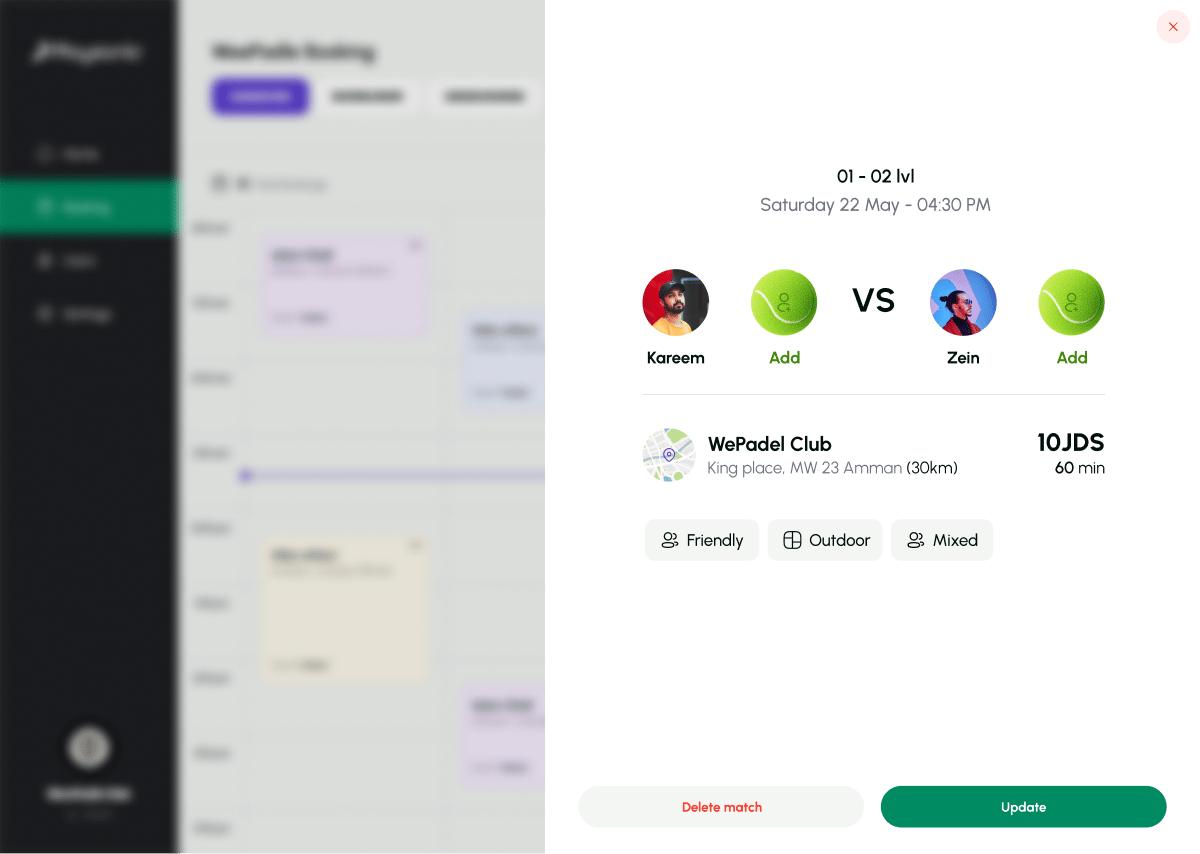
Empty courts and players who cannot find a game.
Every club has the same two problems on the same evening: a court sitting empty at 2pm, and a group of three looking for a fourth. They never meet, because there is no shared place to organize a game.
Playgeko lets your team set up games with the right type, visibility, and skill level, and gives you the pricing and utilization tools to fill the hours that stay quiet.
Games for every kind of player
Friendly and ranked games
Mark a booking as friendly or ranked, and keep your competitive play apart from casual sessions on the calendar and in your analytics. Court bookings and coaching sessions have their own types, so each shows up clearly.
Public or private
Keep a game private to the group that booked it, or make it public so other players can join up to the court’s player limit. Court bookings are always private.
Skill levels from 1.0 to 7.0
Set a minimum and maximum level on a game, from beginner to professional, so a mixed-ability group finds the right match.
Shared costs
When players join a game, each pays an equal share of the court price. No more one person covering the booking and collecting cash afterwards.
Check-in for every player
Players on a booking move from invited to confirmed to checked in. Players can check themselves in, and staff can do it for them at the desk.
Pricing that pulls players into quiet hours
Set cheaper off-peak rates and add date-based overrides for slow periods, then watch the utilization heatmap by day and hour to see whether it works.
Utilization you can act on
See what share of available court time is actually booked, and which days and hours stay empty. Owners and admins get the numbers they need to decide where to promote.
Tournaments when you are ready
Run single or double elimination, round robin, or Swiss events with brackets, seeding, scoring, and entry fees. See the full Tournament Management page for the detail.
Turning a quiet Wednesday into a full one
A typical slow day and the levers you have to change it.
- Monday
The utilization view shows Wednesday afternoons have been under 30% booked for a month.
- Monday
You add a date-based price override for Wednesday 1pm to 4pm and mark the sessions as friendly games for mixed levels.
- Wednesday
Players join, each paying their share of the court. Staff check them in at the desk.
- Next Monday
You check the heatmap again, and decide whether to keep the offer.
Who it helps
Owners
Spot quiet hours, test pricing against them, and keep competitive play organized.
Staff
Set game type, visibility, and level when creating a booking, and check players in.
Players
Play at the right level, split the cost, and stay in the loop on the games you have joined.
Up and running in three steps
- Step 1
Set your hours and prices
Define peak periods, off-peak rates, and any quiet-hour overrides.
- Step 2
Create games
Choose friendly or ranked, public or private, and the skill level range.
- Step 3
Review utilization
Use the heatmap to see which hours fill up, and adjust.
Game types and utilization views are included in every plan. Tournaments are part of the Professional plan.
Works with the rest of Playgeko
Games are bookings, so they live on your calendar. The players who join become members in your CRM, and tournaments take the competition a step further.
Court Booking System
One calendar for every court and sport, so staff and players always see the same real-time availability.
Tournament Management
Registration, seeding, brackets, scoring, and entry fees in one system, from the first sign-up to the final match.
CRM & Member Management
A single member record built from real bookings, with leads, tasks, and WhatsApp conversations alongside it, so your team always has the full picture.
Questions clubs ask
Does Playgeko run leagues and rankings?
Not yet. Today you can mark games as ranked and organize competition through tournaments. Leagues with season standings are not available.
Does Playgeko match players automatically?
Not yet. Your team sets the game type, visibility, and level range when creating a booking. Automatic matchmaking by level and location is not available.
How is the cost split?
When a player joins a game, they pay an equal share of the court price, based on the court’s player limit.
What are the skill levels?
Levels run from 1.0 (beginner) to 7.0 (professional), so you can set a minimum and maximum for each game.
Can I run a tournament with this?
Yes. Tournaments support single and double elimination, round robin, and Swiss formats, and are covered on the Tournament Management page.